What Etsy takes out before paying you
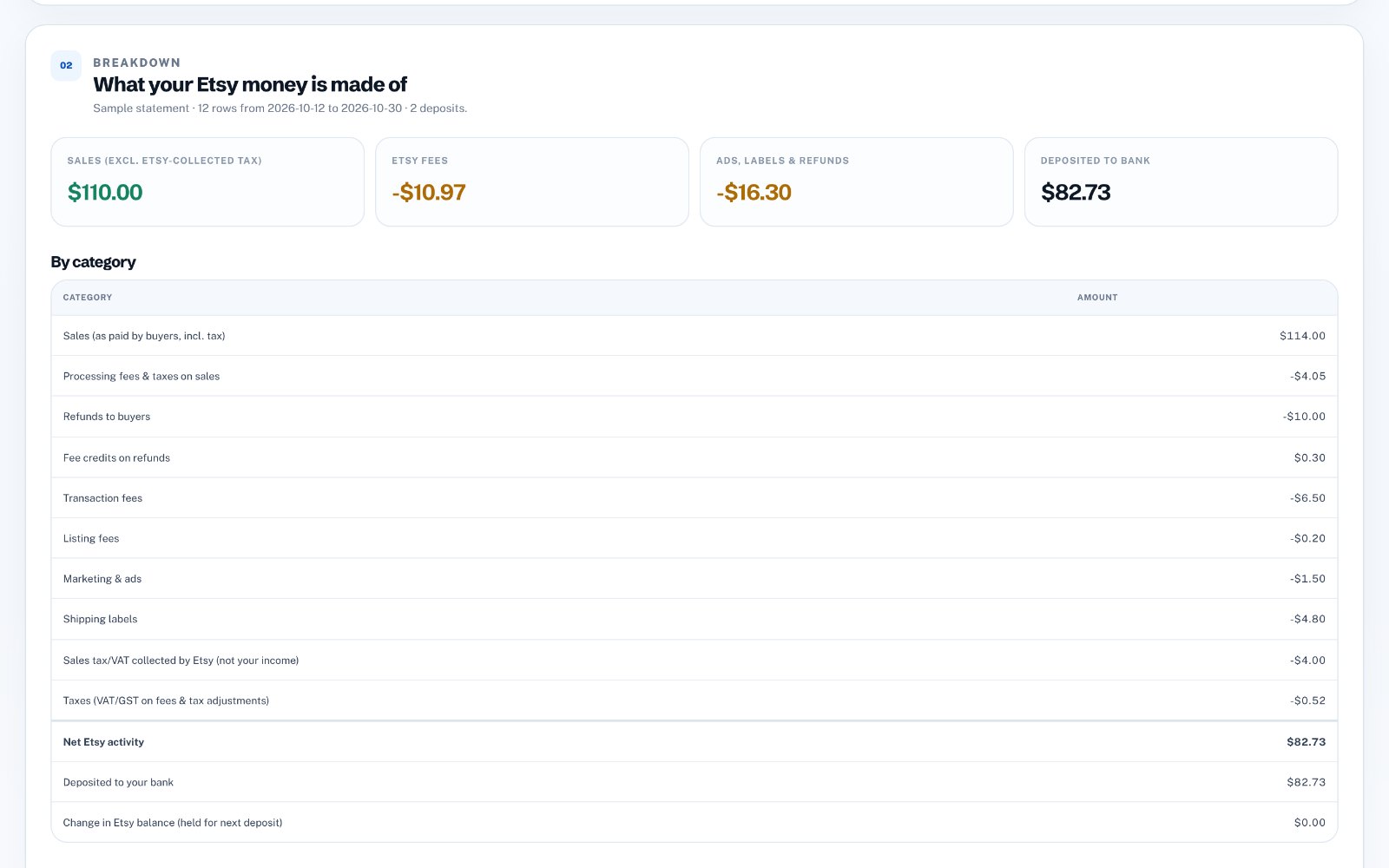
Every deposit is your sales minus everything Etsy charged in the same period. Most of these appear as separate rows in your monthly statement.
- Payment processing fees on each sale
- Transaction fees on items and shipping
- Listing and renewal fees
- Etsy Ads and Offsite Ads fees
- Shipping labels bought through Etsy
- Refunds you issued
- Sales tax or VAT that Etsy collects and pays to governments
- Tax charged on Etsy's own fees in some countries
Sales tax collected by Etsy is not your income
In many places Etsy collects sales tax or VAT from the buyer and pays it to the tax authority itself. That money passes through your statement but never belongs to you, so it should not be counted as sales. Separating it out is one of the most common corrections bookkeepers make.
Timing: why one deposit can cover odd dates
Etsy deposits on a schedule, and some recent sales may be held as a reserve or paid in the next deposit. So a deposit rarely lines up with a calendar month. The reliable method is to group activity between one deposit and the next, then carry any difference forward.
Where to find the data
Go to Shop Manager → Finances → Monthly statements, choose a month and download the CSV. It lists every sale, fee, refund, tax line and deposit, with Amount, Fees & Taxes and Net columns. Deposits show the amount in the title, such as "$52.10 sent to your bank account".
Reconcile it in a few steps
Record gross sales as income, record each fee type as an expense, remove Etsy-collected tax from sales, and post the net to an "Etsy clearing" account. When the deposit arrives in your bank, match it against that clearing account. Any small remainder is money still held by Etsy.
Do it automatically
zastech Etsy Payout Breakdown reads your monthly statement CSV and shows each deposit split into sales, fees, ads, labels, refunds and tax, then creates journal files for Xero and QuickBooks. You do not connect your Etsy shop or bank, and the first three breakdowns are free.